Infinite Access

Infinite Access

Designing a unified mobile companion for Halo Infinite and the Halo ecosystem

ROLE:

Lead UX Designer for Halo Waypoint Mobile. Owned end-to-end UX across iOS and Android, including information architecture, navigation models, onboarding, core flows, research, and design system migration.

Delivered a shippable product supporting a global Halo player base.

TEAM:

4 Engineers

1 Game Designer

1 PM

2 Artists

1 UX Director

1 Audio

DATE:

2021

Infinite Access

Designing a unified mobile companion for Halo Infinite and the Halo ecosystem

ROLE:

Lead UX Designer for Halo Waypoint Mobile. Owned end-to-end UX across iOS and Android, including information architecture, navigation models, onboarding, core flows, research, and design system migration.

Delivered a shippable product supporting a global Halo player base.

TEAM:

4 Engineers

1 Game Designer

1 PM

2 Artists

1 UX Director

1 Audio

DATE:

2021

The

OVERVIEW

The

OVERVIEW

The

OVERVIEW

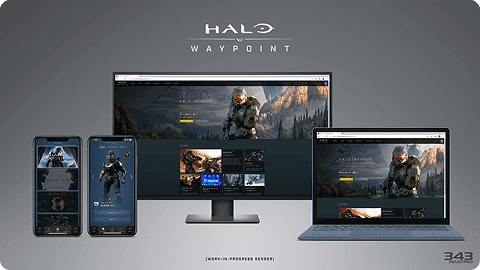
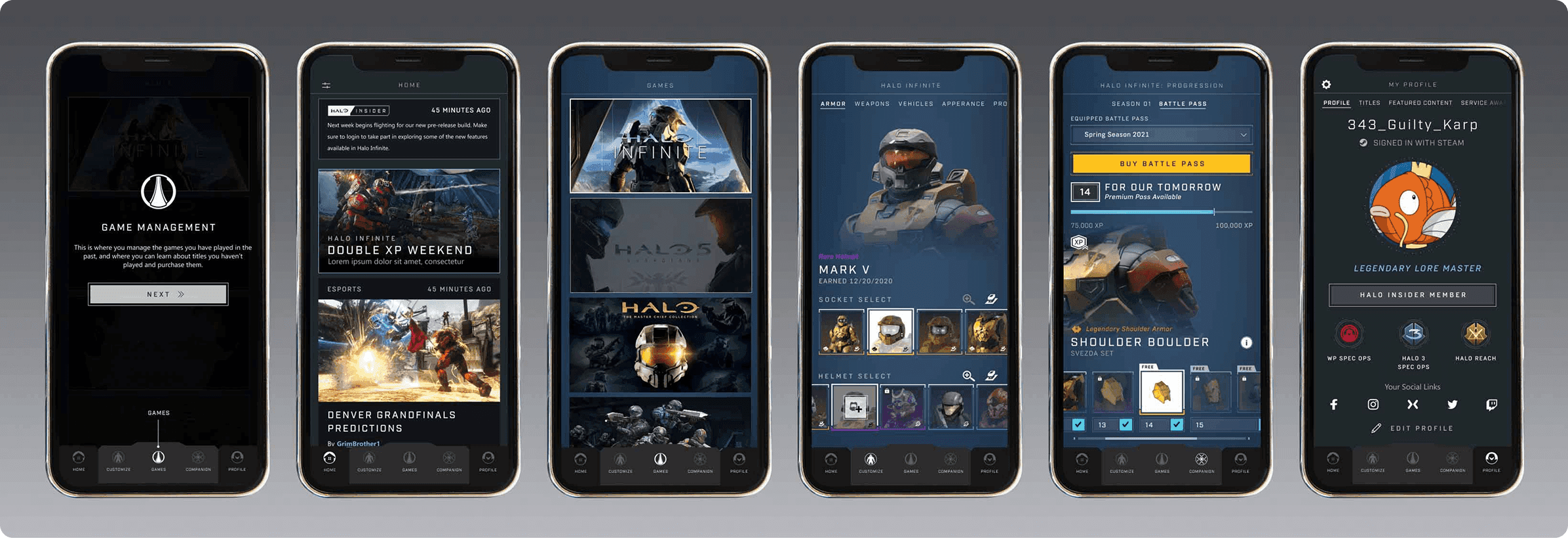
Halo Waypoint is the official mobile companion for the Halo franchise. Launched alongside Halo Infinite, it unified twenty years of player data, stats, customization, news, and community features into a single native mobile experience.

During Infinite’s launch window, Waypoint became the primary touchpoint for players between play sessions. It supported Halo Infinite and legacy titles while establishing a scalable platform for future content, services, and Transmedia updates.

I led UX design for the mobile experience across iOS and Android, owning the information architecture, navigation model, core flows, and onboarding. The goal was to create an experience that felt calm, trustworthy, and cohesive, regardless of game, platform, or player tenure.

Halo Waypoint is the official mobile companion for the Halo franchise. Launched alongside Halo Infinite, it unified twenty years of player data, stats, customization, news, and community features into a single native mobile experience.

During Infinite’s launch window, Waypoint became the primary touchpoint for players between play sessions. It supported Halo Infinite and legacy titles while establishing a scalable platform for future content, services, and Transmedia updates.

I led UX design for the mobile experience across iOS and Android, owning the information architecture, navigation model, core flows, and onboarding. The goal was to create an experience that felt calm, trustworthy, and cohesive, regardless of game, platform, or player tenure.

The

CHALLENGE

The

CHALLENGE

The

CHALLENGE

Halo Waypoint supported multiple games, services, and communities, but the experience was fragmented across titles and built primarily for the web. Mobile users lacked a native way to check stats, track progression, or stay connected between play sessions.

Designing a companion app meant more than translating the website to mobile. Each Halo title had its own data model, legacy flows did not scale, and web-first navigation patterns broke down on smaller screens. First-time users hit friction immediately, while long-time Halo 5 and MCC players needed instant access to their Service Records and Game History.

The challenge was to unify Halo’s complex ecosystem into a fast, native mobile experience that balanced legacy and new players, preserved parity without copying the web, and made accessing progression and stats feel effortless.

Halo Waypoint supported multiple games, services, and communities, but the experience was fragmented across titles and built primarily for the web. Mobile users lacked a native way to check stats, track progression, or stay connected between play sessions.

Designing a companion app meant more than translating the website to mobile. Each Halo title had its own data model, legacy flows did not scale, and web-first navigation patterns broke down on smaller screens. First-time users hit friction immediately, while long-time Halo 5 and MCC players needed instant access to their Service Records and Game History.

The challenge was to unify Halo’s complex ecosystem into a fast, native mobile experience that balanced legacy and new players, preserved parity without copying the web, and made accessing progression and stats feel effortless.

The

OBJECTIVE

The

OBJECTIVE

The

OBJECTIVE

Design a mobile-first UX that unified Halo Infinite and two decades of legacy titles into one clear, consistent experience. The goal was to reduce friction across platforms, streamline onboarding, and create a navigation model that worked for every type of Halo player.

At a system level, the objective was to deliver clarity and speed while establishing a scalable foundation that could support future games, live updates, and Transmedia content.

Design a mobile-first UX that unified Halo Infinite and two decades of legacy titles into one clear, consistent experience. The goal was to reduce friction across platforms, streamline onboarding, and create a navigation model that worked for every type of Halo player.

At a system level, the objective was to deliver clarity and speed while establishing a scalable foundation that could support future games, live updates, and Transmedia content.

Cross-Title Consistency

Create a unified structure across Infinite, Halo 5, MCC, and future titles to reduce cognitive load as players move between games.

Mobile-First Clarity

Translate complex console systems into fast, readable mobile patterns optimized for short sessions.

Scalable Architecture

Build an IA and navigation model flexible enough to support evolving Halo content and services.

The

PROCESS

The

PROCESS

The

PROCESS

Audience & Player Insights

Research focused on understanding what players expected from a unified Halo mobile experience. I reviewed community feedback, Halo Channel usage, legacy behaviors, and stakeholder input to identify core needs: fast access to stats, service records, game history, progression, and franchise updates across titles.

These insights shaped how the app needed to work on mobile. Players wanted familiarity without friction, parity without complexity, and a way to move between Halo Infinite and legacy titles without relearning the experience.

Research focused on understanding what players expected from a unified Halo mobile experience. I reviewed community feedback, Halo Channel usage, legacy behaviors, and stakeholder input to identify core needs: fast access to stats, service records, game history, progression, and franchise updates across titles.

These insights shaped how the app needed to work on mobile. Players wanted familiarity without friction, parity without complexity, and a way to move between Halo Infinite and legacy titles without relearning the experience.

Research focused on understanding what players expected from a unified Halo mobile experience. I reviewed community feedback, Halo Channel usage, legacy behaviors, and stakeholder input to identify core needs: fast access to stats, service records, game history, progression, and franchise updates across titles.


These insights shaped how the app needed to work on mobile. Players wanted familiarity without friction, parity without complexity, and a way to move between Halo Infinite and legacy titles without relearning the experience.

Tooling & Workflow

To support a product of this scale, I moved the team from Adobe XD to Figma. This shift created a shared source of truth across UX, UI, and engineering, unlocked real-time collaboration, and reduced handoff friction.

The new workflow enabled consistent components, faster iteration, and a scalable design system that supported Halo Infinite while accommodating legacy titles. This became a foundational improvement for the team.

Information Architecture

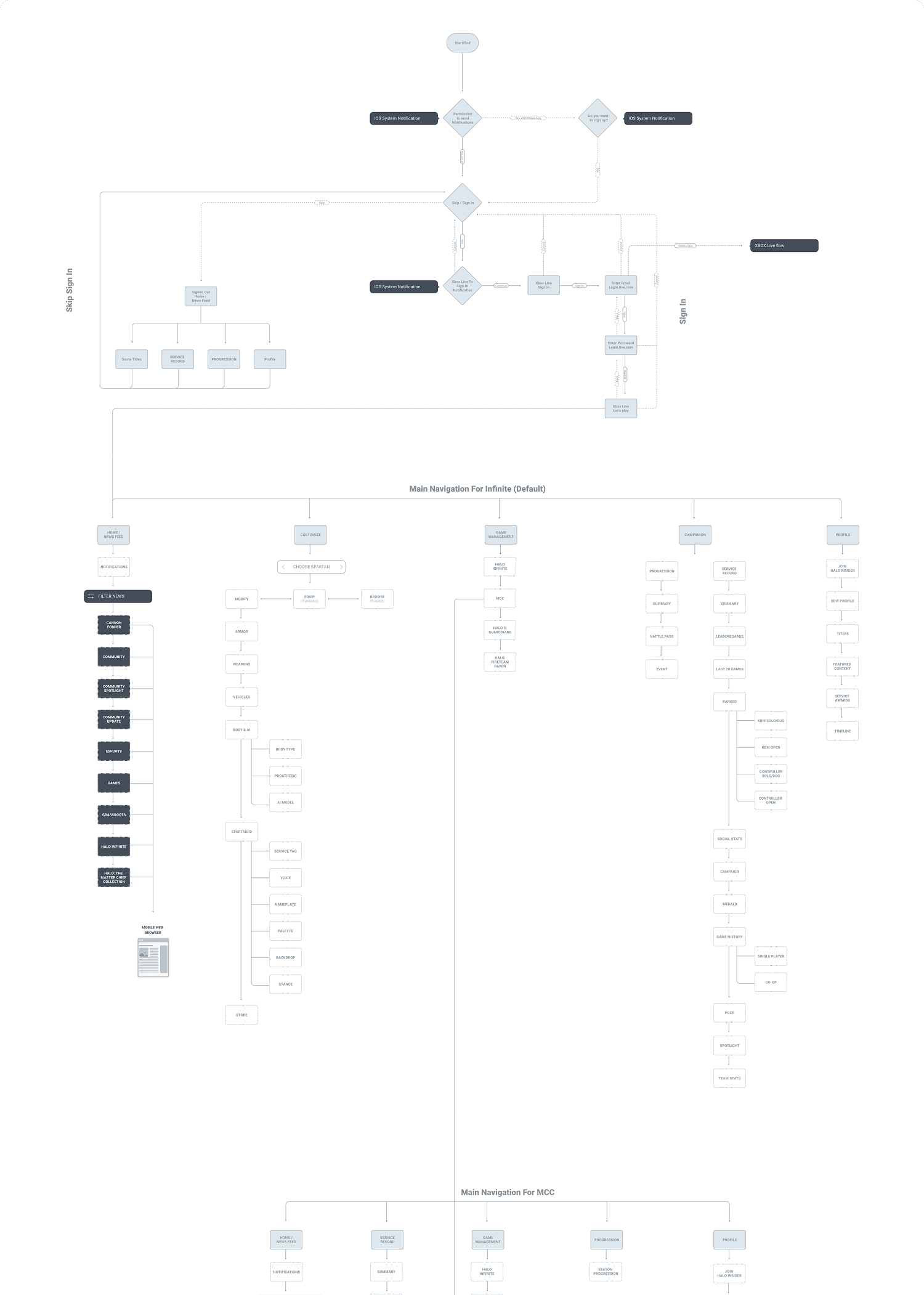
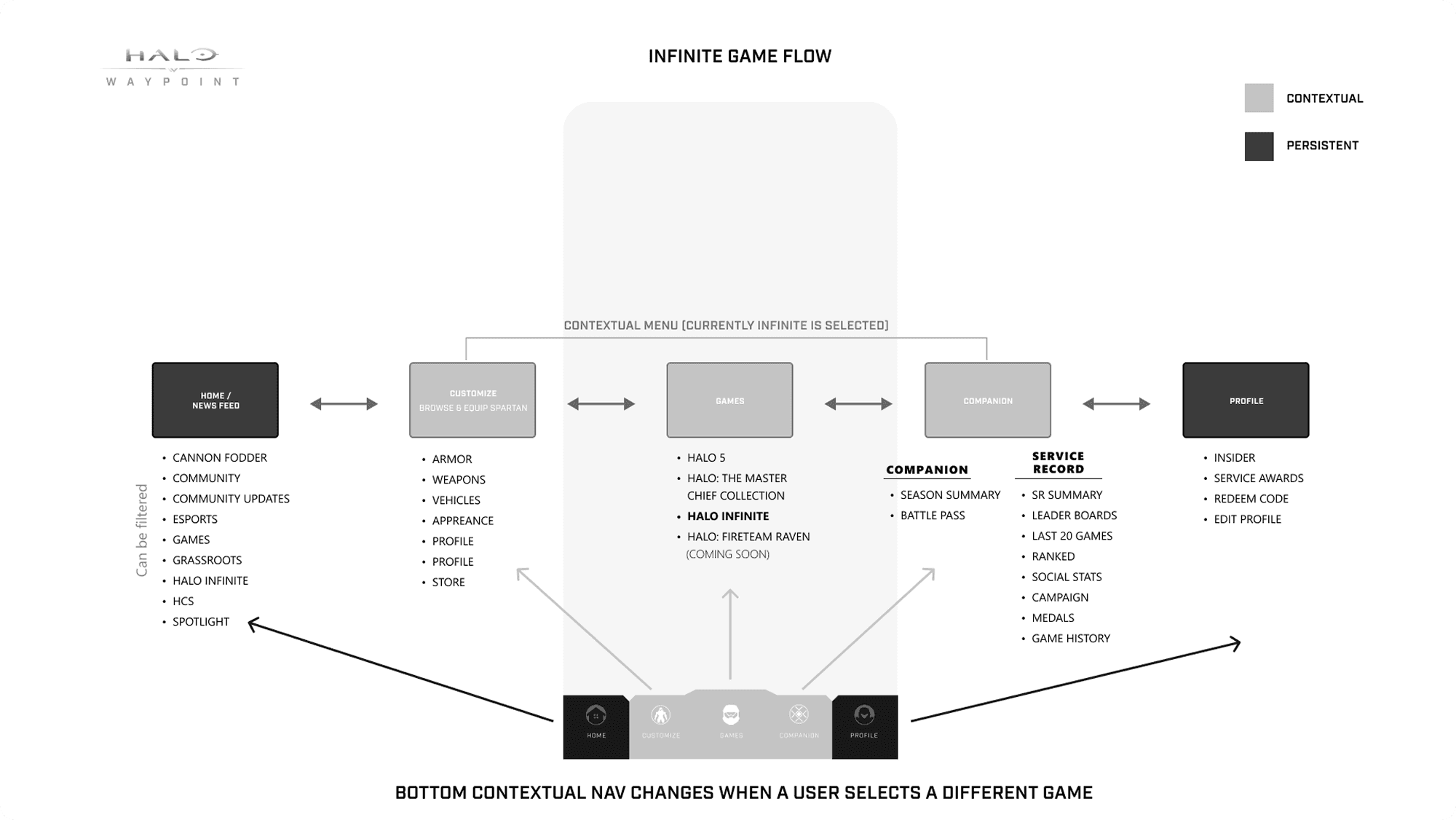
I rebuilt the Waypoint IA around a single, predictable navigation model that worked across Halo Infinite and every legacy title. I mapped flows from onboarding through deep-dive experiences like service records, customization, and game history.

By tightening hierarchy and trimming unnecessary screens, we created a mobile-first architecture that reduced cognitive load and allowed players to move between titles with confidence.

Persistent Navigation System

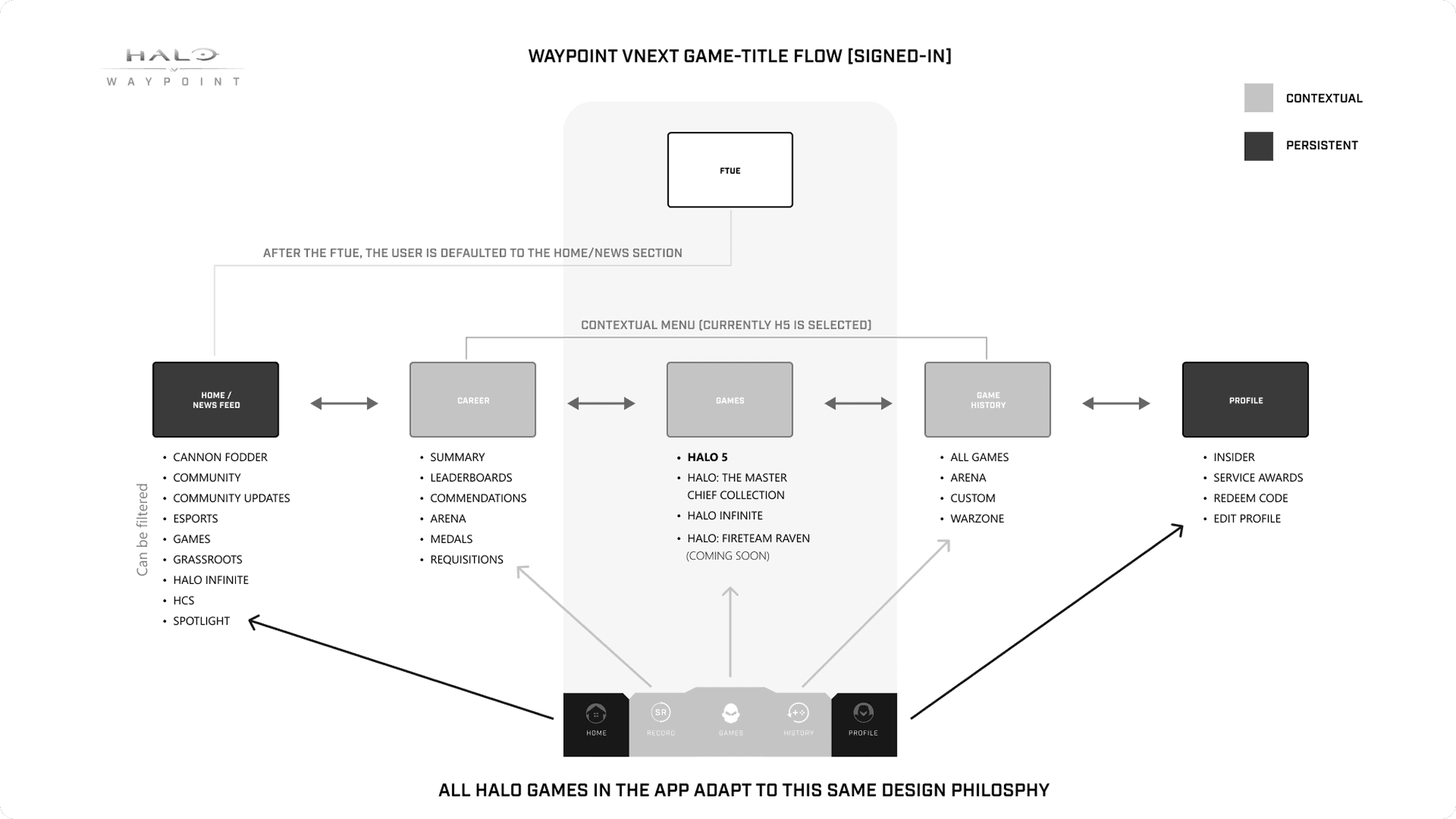
I introduced a consistent bottom navigation model with Home, Career, Game History, Customization, and Profile. This replaced fragmented, title-specific menus and gave players a predictable structure across Infinite, Halo 5, MCC, and future titles.

While the navigation stayed consistent, the background and visual theming adapted to the active game, allowing each title’s identity to come through without changing the underlying UX. This reduced cognitive load and made moving between games feel effortless, even as data models differed under the hood.

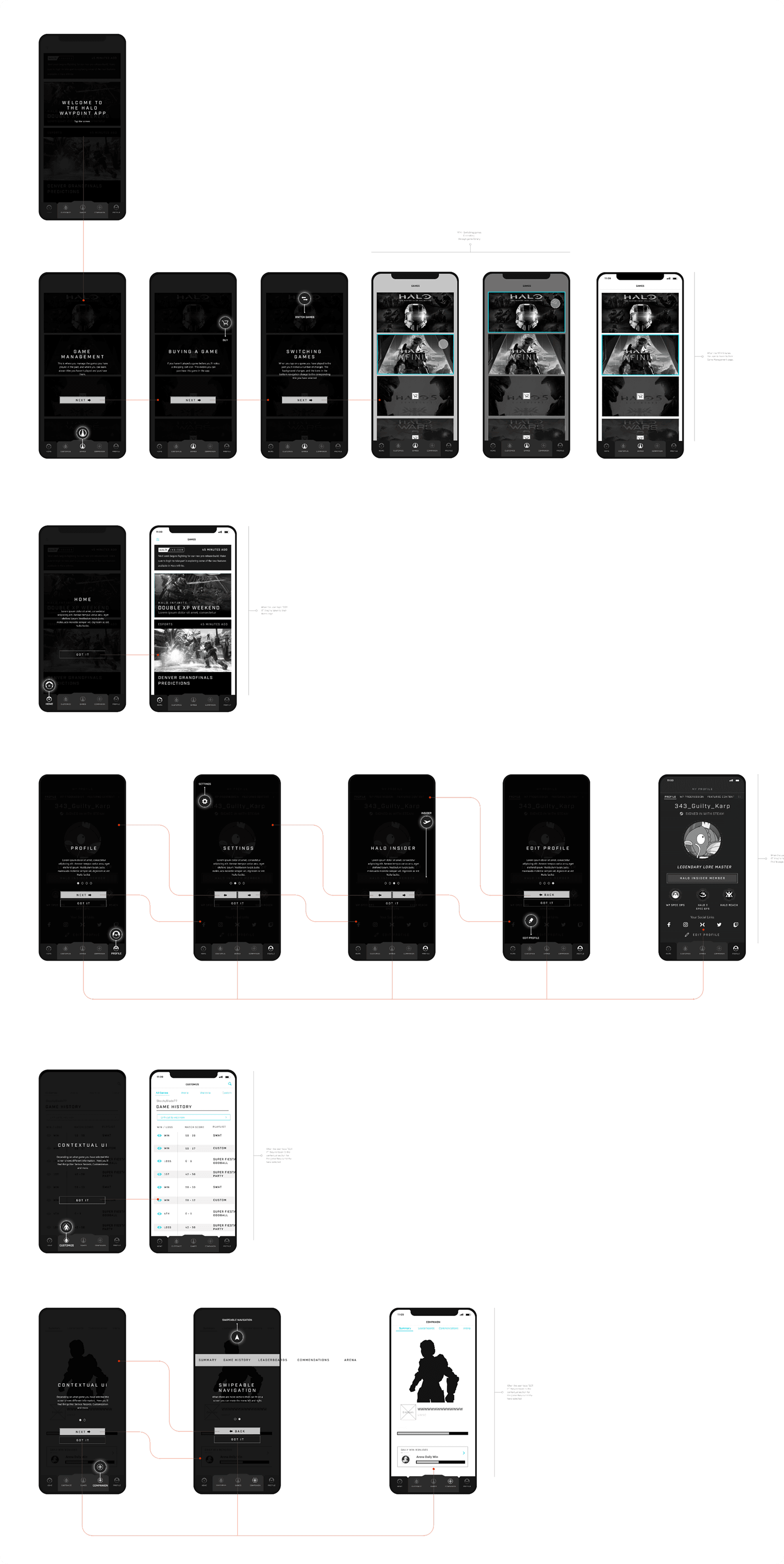
Wireframes Examples

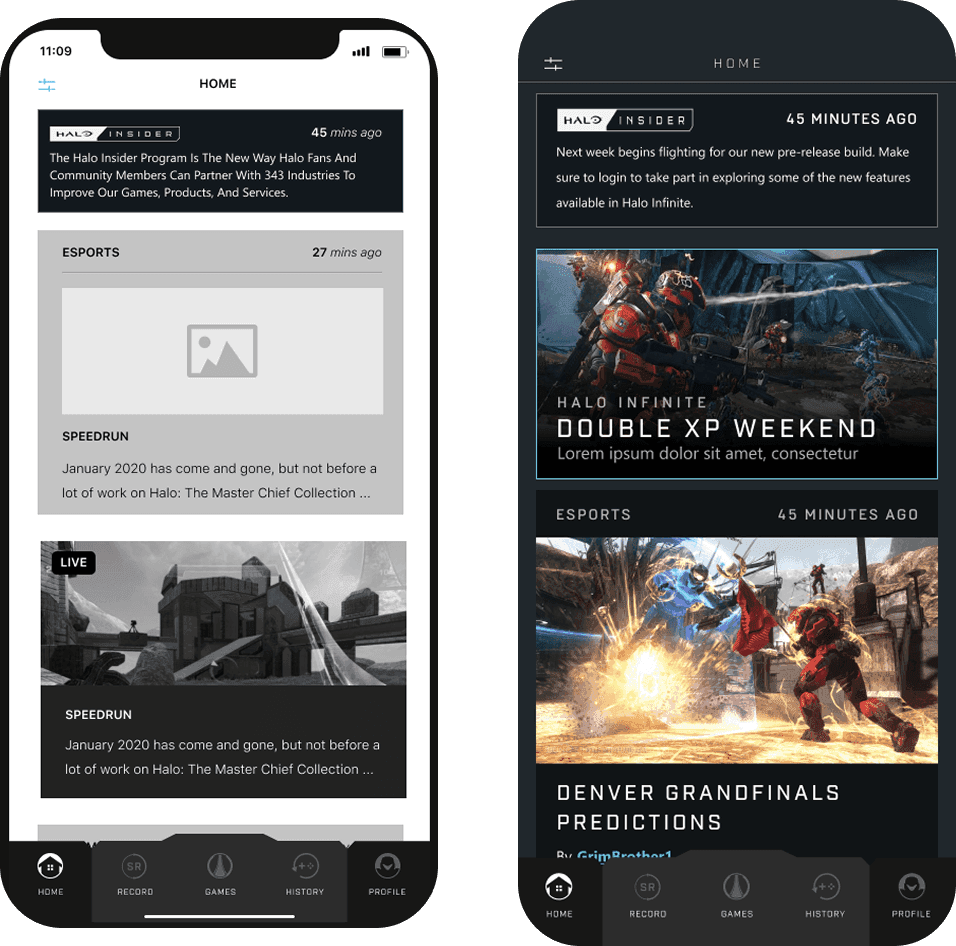
I designed the full set of wireframes for the Halo Waypoint mobile app across iOS and Android. These flows covered onboarding, navigation, service records, game history, customization, and Infinite-specific experiences, all built on a shared system that worked across multiple Halo titles.

I worked closely with a visual UI artist to translate these flows into polished, production-ready designs aligned with Halo’s aesthetic. Together, we ensured the interface felt modern, premium, and unmistakably Halo while remaining fast, readable, and mobile-first.

Home / News Feed

A customizable feed for Halo news, updates, esports, and community content. Players could filter by title and interests, keeping the experience relevant and personal.

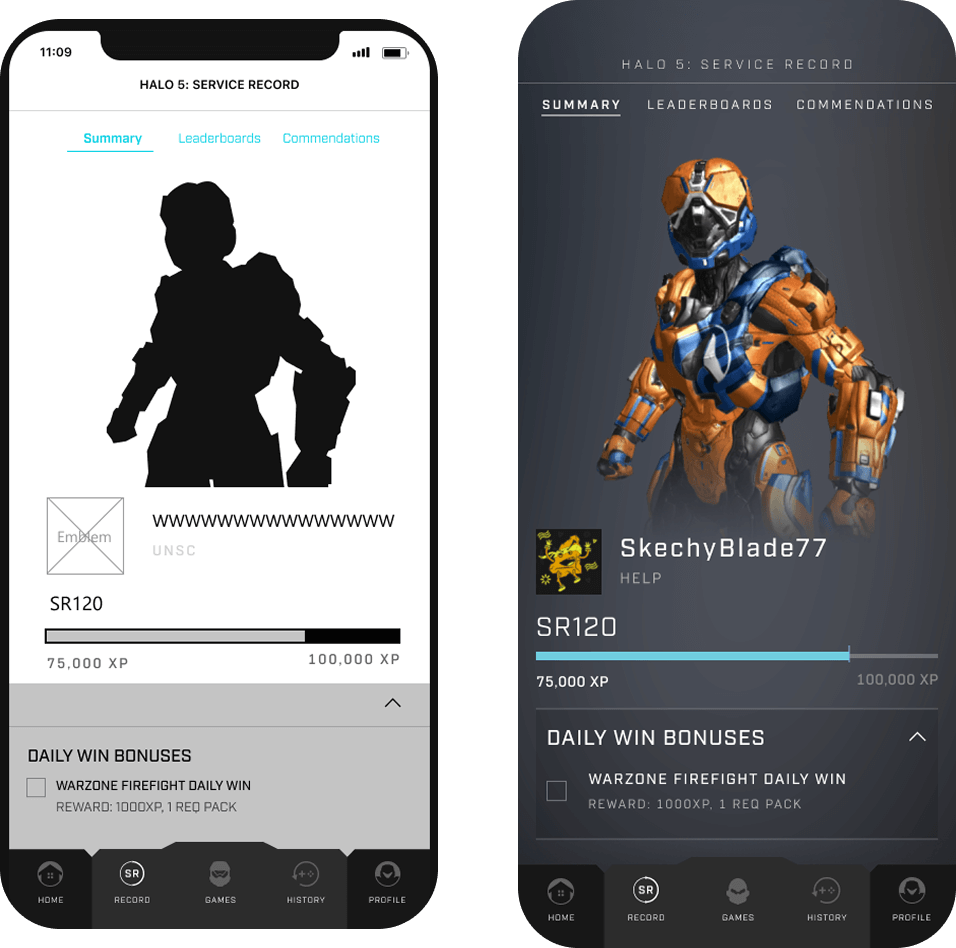
Service Record

Clean, mobile-optimized views for wins, skill ranks, medals, arena stats, and campaign progress. The hierarchy mirrors Infinite’s visual language while supporting legacy data formats.
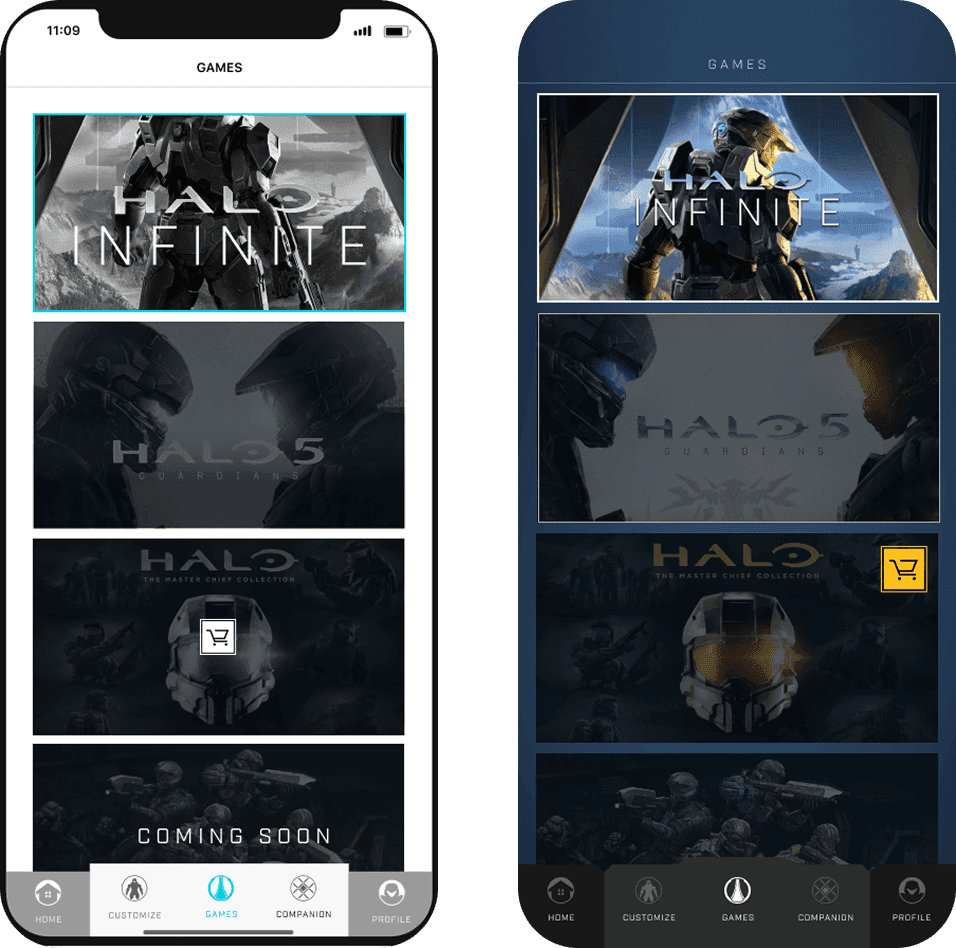
Game Management

A unified flow where players select titles, browse platforms, and view game history. Cross-platform transitions and purchase paths were simplified to reduce friction.

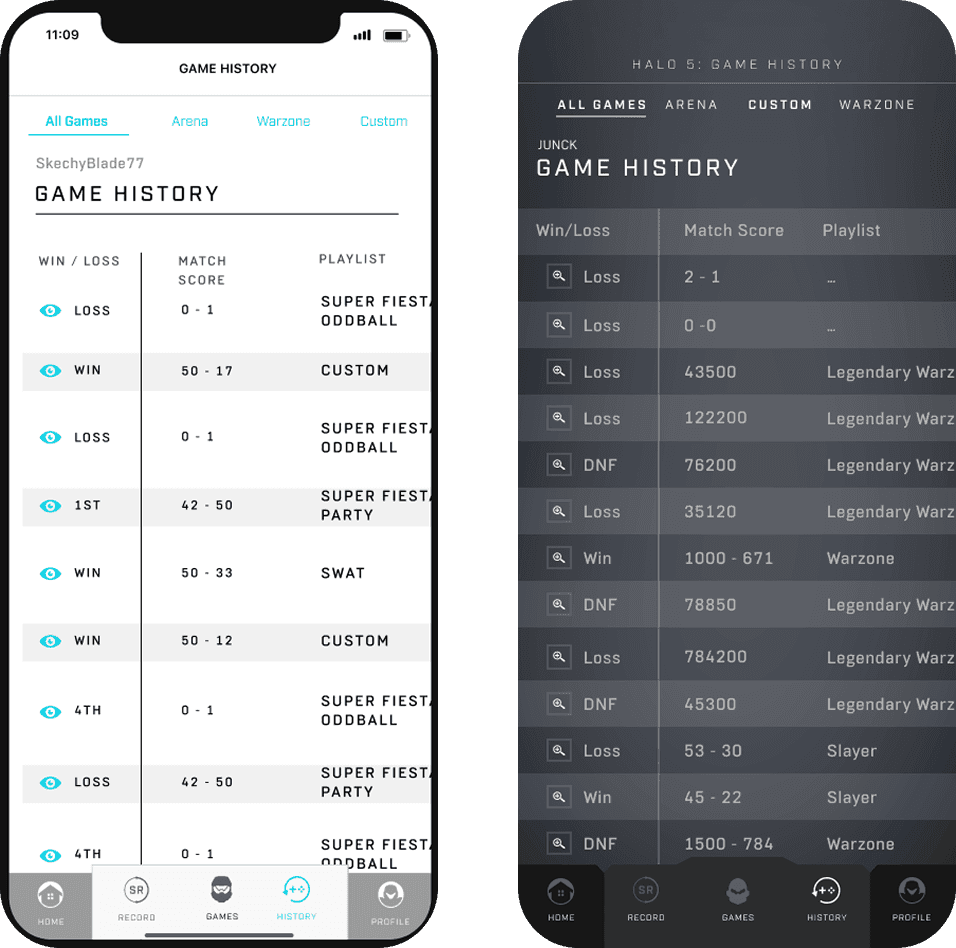
Game History

A session-by-session log that scaled across Infinite, MCC, Halo 5, and Fireteam Raven. The redesigned swipe model replaced static lists and made multi-team sessions easier to explore.
Profile

A streamlined space for account linking, subscription management, badges, and customization assets. This consolidated profile data into a single, mobile-friendly experience.

Halo Infinite Specific Persistent Navigation System

For Halo Infinite, I created game-specific wireframes that extend the shared Waypoint system while adapting to Infinite’s unique features. These screens show how contextual navigation shifts when Infinite is selected, enabling flows like Spartan customization and Battle Pass progression that don’t exist in other titles

Halo Infinite- Wireframe Examples

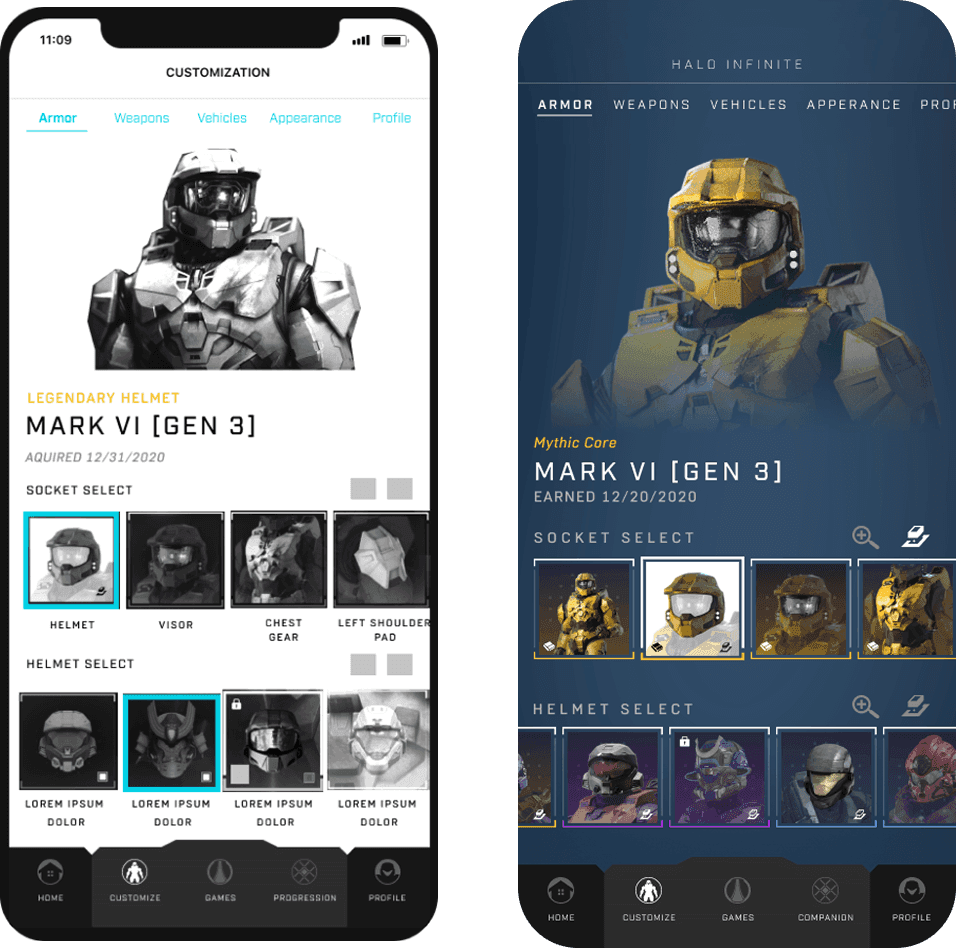
Halo Infinite introduced new progression and customization systems that required deeper mobile support than any previous Halo title. I designed Infinite-specific flows that extended the shared Waypoint framework while adapting to Infinite’s unique mechanics, ensuring the experience felt native without fragmenting the system.

Halo Infinite Customization

I designed a mobile-first system for browsing armor cores, sockets, and items quickly. The experience mirrors Infinite’s in-game customization while staying consistent with shared Waypoint patterns, making loadout management fast and intuitive on mobile.

Halo Infinite Progression / Battle Pass

Halo Infinite introduced a more complex progression loop built around Operations and the Battle Pass. I designed a mobile-first flow that lets players preview rewards, track XP, and browse tiers quickly, mirroring the in-game experience without sacrificing clarity on mobile.

Key Interaction Pivot After Wireframes

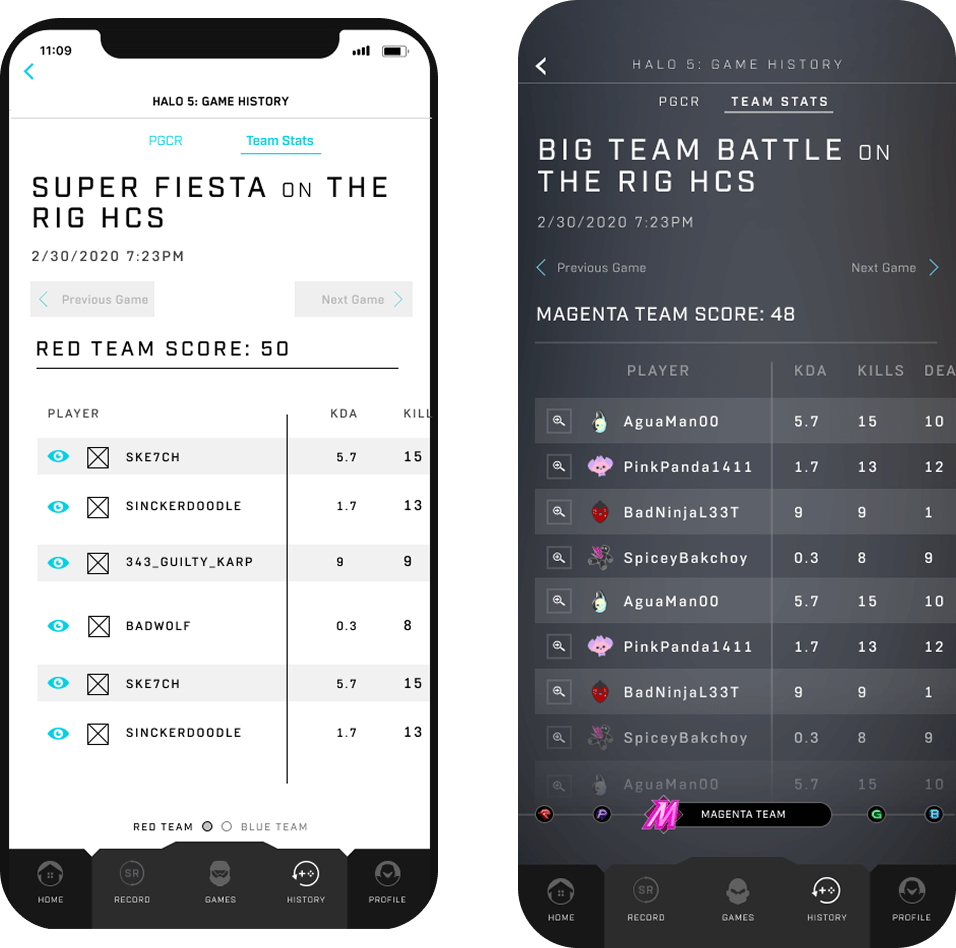
Early testing showed the original Halo 5 match history layout didn’t scale beyond two teams. Multi-team sessions quickly became dense and hard to read on mobile.

I redesigned the interaction into a horizontal swipe model, allowing players to move between teams and details without overwhelming the screen. The final pattern scaled cleanly, improved comparison, and became the version shipped to engineering.
Scalable Match History

Early designs used a static two-team layout that broke down in multi-team matches. I pivoted to a horizontal swipe model that let players move between teams quickly, resulting in a cleaner hierarchy, faster comparisons, and a scalable pattern that shipped.

Prototype Example

Early prototypes revealed that placing external links directly into the core app created friction and visual noise. Players came to Waypoint to check stats, progression, and customization. Pushing gear, esports, and universe content into the primary navigation disrupted those core tasks.

To solve this, I spent 30 mins and designed a dedicated Transmedia layer that appears only on demand. Tapping Open reveals a focused secondary navigation for Halo Gear, Esports, and universe content. This approach keeps the main experience clean and task-focused, while still giving players structured access to Halo’s broader ecosystem without leaving the app or losing context.

Adding Transmedia Layer to the UI

Testing & Validation

I partnered with the Microsoft Research team to run usability sessions across iOS and Android builds, validating navigation clarity, onboarding, and cross-title flows. Sessions were conducted in person at Xbox Research and synthesized into an expert report that guided final refinements.

During testing A critical insight emerged: the FTUE was too dense. Players wanted to play, not read. We redesigned onboarding into a leaner, visual-first flow that reduced friction and performed significantly better.

The

RESULTS

The

RESULTS

The

RESULTS

The redesigned Waypoint mobile experience shipped alongside Halo Infinite and immediately improved how players engaged with the Halo ecosystem on mobile. A unified navigation model reduced confusion between titles, while streamlined, mobile-first flows made core tasks like checking stats, browsing history, and customizing Spartans faster and easier to complete.

Infinite-specific features such as Customization and Battle Pass progression fit naturally into the shared structure, allowing players to move between titles without relearning the experience. The app launched to a 4-star App Store rating, showed increased feature exploration, and became a reliable companion that kept players engaged off-console.

Behind the scenes, the work also changed how we shipped UX. Partnering closely with Microsoft Research, we established a repeatable workflow for usability testing, planning, and expert reviews. This reduced UX exceptions per title, increased stakeholder confidence, and enabled new Halo features to ship without reworking the core navigation or information architecture.

The

TAKEAWAY

The

TAKEAWAY

The

TAKEAWAY

Designing Waypoint reinforced the importance of building systems that scale across products, teams, and time. Unifying navigation across Infinite and legacy Halo titles required focusing less on individual screens and more on structure, consistency, and player trust.

This project also established a new collaboration model with Microsoft Research, embedding usability testing, planning, and expert reviews directly into the design workflow. That partnership helped validate decisions early and reduced risk as the product scaled.

The work and approach were later featured in the Inside Infinite interview series, highlighting both the design direction and the cross-team collaboration behind Waypoint’s launch.

https://www.halowaypoint.com/en-us/news/inside-infinite-june-2021